

The table below is the fastest route to your document. Every file is a PDF you can read on a phone or save for later, and each Ideal range has two: a short user guide written for the person who lives with the boiler, and a longer installation and servicing manual written for the engineer who works on it.
Ideal boiler manuals to download
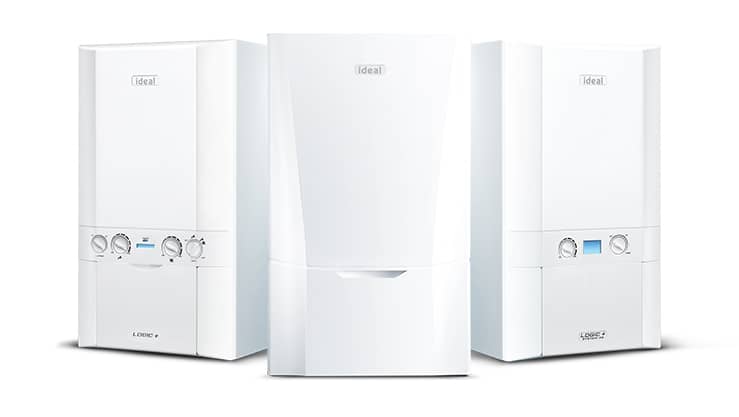
Find your range in the left-hand column. If the badge on your boiler reads something like "Logic Combi ESP1 30" or "Vogue Max System 32", the range name is the part you are matching, not the number.
User guide or installation manual: which one do you need?
They are two different documents, and people download the wrong one all the time.
- The user guide is the homeowner's document. It covers the controls, how to set the heating and hot water, how to read the display, how to top the pressure back up, and what the frost protection does. It is the one you want if the boiler is working but you cannot make it do what you want.
- The installation and servicing manual is written for the engineer. It carries the technical data, the gas rate and combustion figures, wiring diagrams, the exploded parts list with part numbers, flue options and the full fault-code diagnostic tables. It is the document a Gas Safe registered engineer works from, and a useful thing to send over when you are getting a repair quoted.
Downloading the installation manual is fine. Working from it is not. Under the Gas Safety (Installation and Use) Regulations 1998, only a Gas Safe registered engineer may work on a gas appliance in a home, and that covers taking the case off, touching the gas valve, or anything to do with the flue or the combustion settings. If you can smell gas, leave the boiler alone, open the windows and call the National Gas Emergency Service on 0800 111 999.
How to identify your Ideal boiler model
If you are not sure which row of the table is yours, the serial number settles it. Ideal's own answer is that "the serial number is displayed on a barcoded sticker located at the top of the boiler. Alternatively, it should be present on the Benchmark certificate completed by the installer when the boiler was fitted."
Three places to look, in order:
- The boiler itself. Ideal says the barcoded sticker sits at the top of the boiler. The badge carries the model name, the output in kW and the serial number. If you cannot read it without taking anything off, leave the case alone and use one of the two routes below.
- The Benchmark book. The installer filled this in on the day, and it records the model, the serial number and the installation date.
- Ideal's customer services. Call 01482 498660 with the serial number and they can confirm the exact model and point you at the right document. Full opening hours are on our Ideal contact numbers page.
Getting the model right matters more than it sounds. Fault codes are not consistent across the whole Ideal range, and the parts list changes between generations that share a name.
Ideal model names ending in 2: Logic2, Exclusive 2, Esprit Eco2
A lot of Ideal boilers carry a "2" on the badge, and it marks a genuine second generation rather than a size. Ideal publishes separate documents for them, so a manual for the original range will not always match the boiler in front of you.
The common ones are the Logic2 family (Logic Combi2, Logic System2, Logic+ Combi2, Logic MAX Combi2, Logic MAX System2), the Exclusive 2, the Esprit Eco2, the Classic 2, the Instinct 2, the i-Mini2, the Evomax 2 and the Imax Xtra 2. If your badge reads one of those, download the version that names it. Ideal hosts them in its own library at idealheating.com/user-guides, which it describes as "our handy user manuals for Ideal boilers, Heat Pumps, thermostat controls and accessories", browsable by range and by product type.
Some discontinued names still have a document in the table above, including the icos and the Mexico HE. If the range on your badge is not listed there or in Ideal's own library, Ideal's customer services line is 01482 498660.
Ideal commercial boiler manuals
Evomax, Evomax 2, Imax Xtra and Imax Xtra 2 are commercial products, and Ideal keeps their literature on a separate site. Ideal Commercial's downloads library holds installation and servicing manuals, user guides, specification sheets, CAD drawings, brochures and ErP product fiches. It covers the current Evomax 2, Imax Xtra 2, Imax Xtra EL, Evomod, Evojet, Independent Heat and Vanguard L, and it keeps discontinued ranges as well.
Ideal safety notice: Logic2 and i-Mini2 boilers
If you are looking up a manual for a Logic2 or an i-Mini2, this is worth two minutes. In February 2024 Ideal published a customer safety notice covering the Logic Combi2, Logic System2, Logic+ Combi2, Logic+ System2, Logic MAX Combi2, Logic MAX System2, iMini2, Independent Combi2, Keston Combi2 and Keston System2 made between August 2022 and 7 January 2024.
Ideal's own description is that "in a small proportion of the affected range of boilers (approximately 1 in 10,000), if an excessive volume of air has become trapped inside the boiler in a fault condition, it could cause the boiler to overheat and fail". Ideal's notice says "customers can continue to use their boiler", advises repressurising it and publishes the steps for that on its own dedicated page, and asks owners to register their details at idealsupport.co.uk or call 0808 175 9173 to book the modification. The full notice is on Ideal's website.
If the pressure gauge is the thing that brought you here in the first place, our guide to Ideal boiler pressure shows where the filling loop sits on each range and what the needle should read.
The Benchmark book and your service record
The booklet at the back of the manual pack is the Benchmark gas boiler commissioning checklist and service record. The installer completes the commissioning page on the day, and every engineer who services the boiler afterwards signs a further page.
Losing it is annoying rather than fatal, but it is the document manufacturers ask for when a warranty repair is requested, because it is the proof the boiler was commissioned properly and serviced every year. Ideal publishes a blank copy of the Benchmark checklist. If you have lost yours, ask the engineer who last serviced the boiler for a copy of their record, and see our page on the Ideal boiler warranty for what Ideal expects to see.
When the manual is not the answer
Most people arrive on a manuals page mid-problem rather than out of curiosity. The manual genuinely solves some of it: setting a timer, understanding the preheat, topping up pressure that has crept down over a winter.
It will not solve a boiler that keeps locking out. If yours is showing a code, our Ideal fault code list explains what each one means in plain English and which ones have a safe check you can do yourself first. If it has stopped without a code, or it locks out again within a day of a reset, that is an engineer's job. A repair visit also tends to reveal whether the boiler has been serviced, and our page on what a boiler service includes covers what should be checked each year.
When the manual runs out of answers.
A Smart Plan cover plan is a service plan, not insurance. You pick only the cover you want. Parts and labour are included up to your cover limit, which for boiler and central heating cover is £500 in any 12-month period if the boiler is under 7 years old, or £200 if it is over 7 years. A £95 call-out fee, paid in advance, applies in your first 30 days, and after that to faults the plan does not cover, visits where we cannot get access, and annual services requested early. Cover itself still applies right through those first 30 days. Once you use a service, a 12-month agreement period applies. We work with a national network of thousands of Gas Safe registered engineers and aim to get one out to you within two working days, with cover-plan call-outs booked Monday to Friday, 08:00 to 18:00.
Can't find your Ideal boiler manual?
If the range you need is not in the table, try these three in order.
- Ideal's own library at idealheating.com/user-guides, which lets you browse by range (MAX, Vogue, Logic, Logic+, heat pumps, cylinders, controls) or by product type.
- Ideal Commercial's downloads at idealcommercialboilers.com/downloads for Evomax, Imax Xtra and the rest of the commercial range, including discontinued products.
- Ideal customer services on 01482 498660, with the serial number to hand. This is the route for genuinely old boilers whose document has been retired.
If you have found the manual and it still has not fixed the problem, request a free callback and we will talk through what is likely to be wrong and what a repair involves.